Google Trends Interest Over Time API
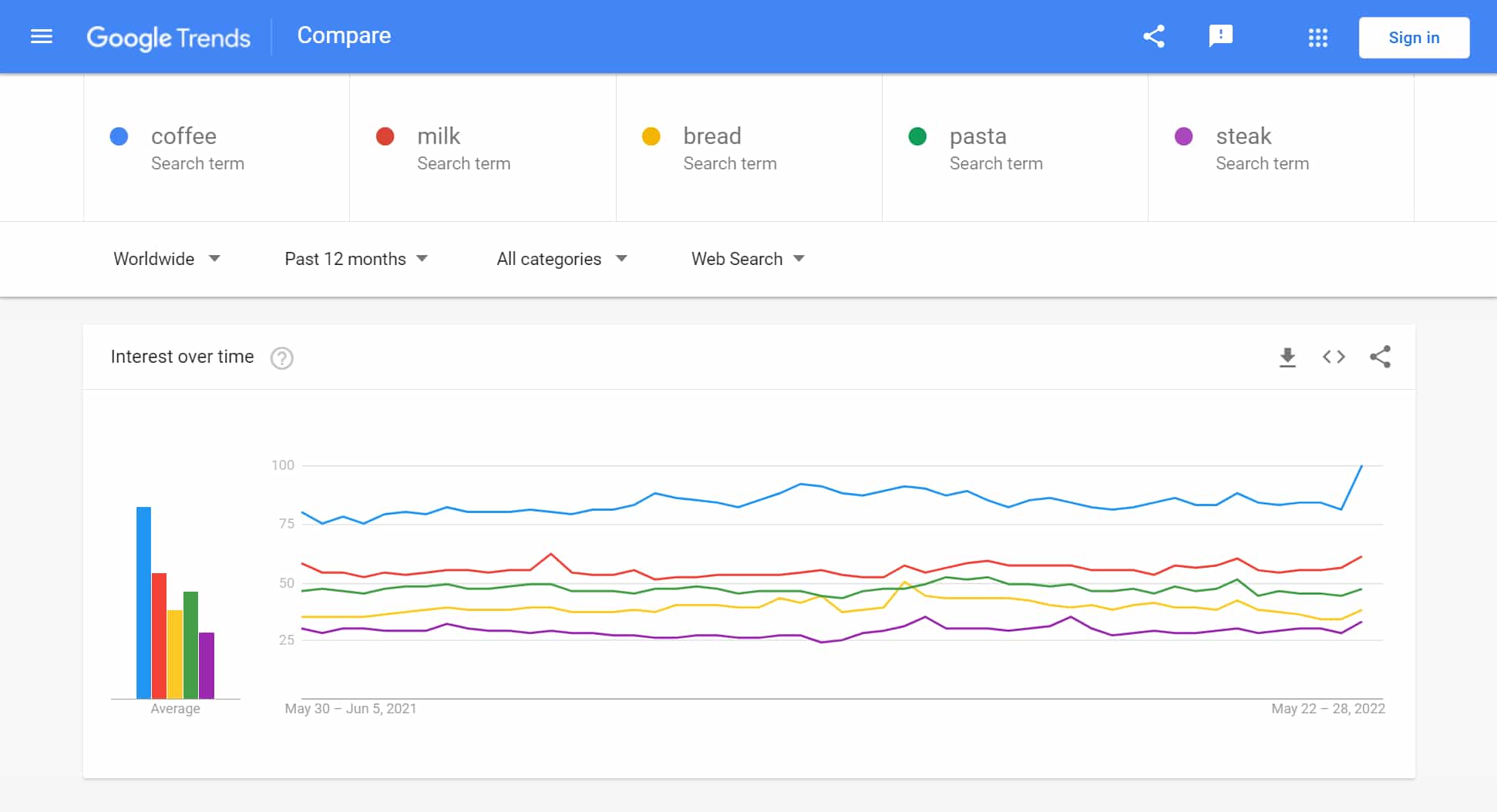
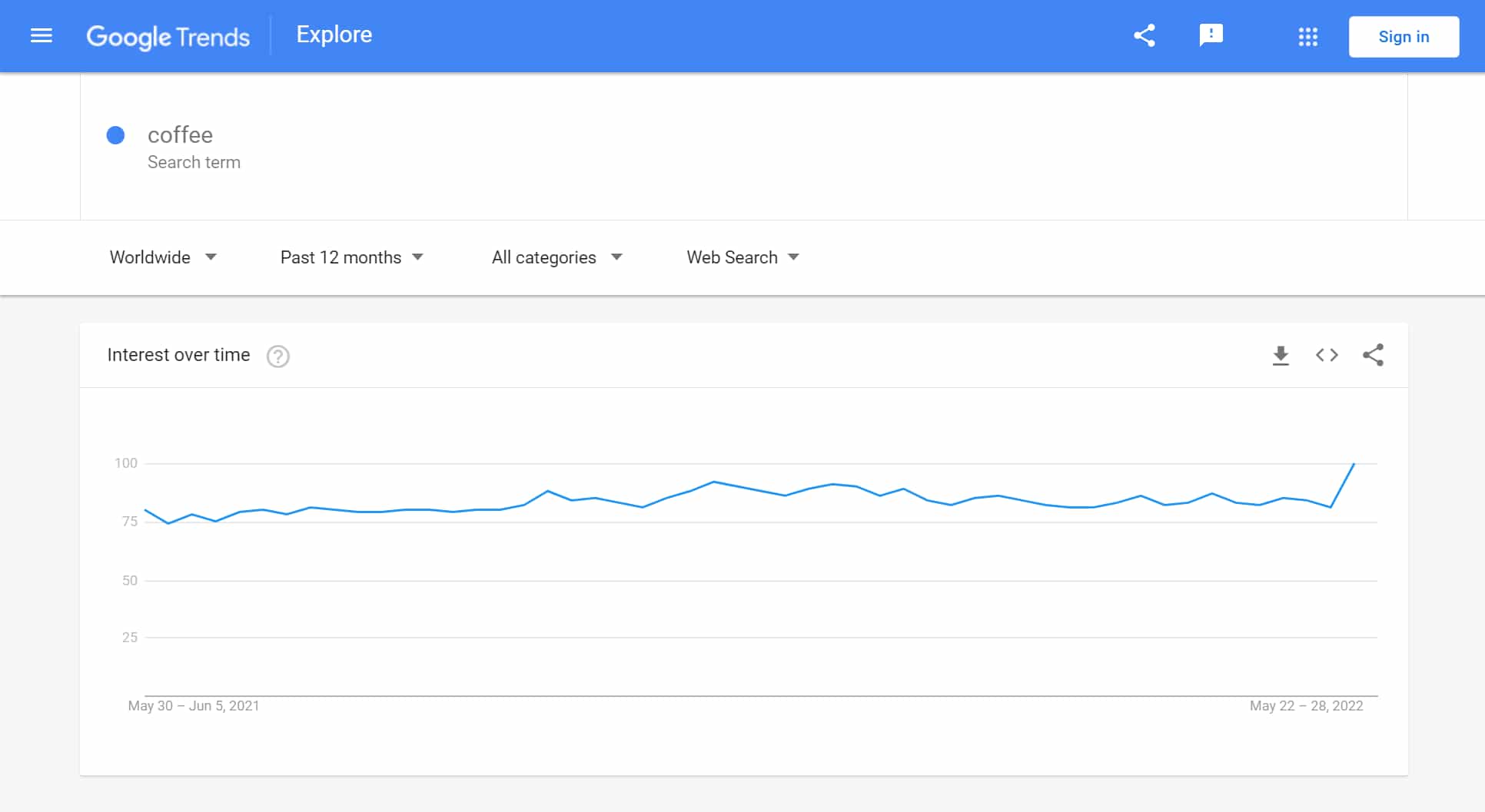
When a Google Trends search contains interest over time results, they are parsed and exist within the interest_over_time object in the JSON output. Interest over time can contain timeline_data and averages array results. From timeline_data we are able to extract date and values array which contains query, value, and extracted_value. From averages we are able to extract query and value.
The API endpoint is https://serpapi.com/search?engine=google_trends
Head to the playground for a live and interactive demo.
API Examples
Example with multiple queries
{
  "interest_over_time": {
    "timeline_data": [
      {
        "date": "May 30 – Jun 5, 2021",
        "timestamp": "1622304000",
        "values": [
          {
            "query": "coffee",
            "query_index": 0,
            "value": "80",
            "extracted_value": 80
          },
          {
            "query": "milk",
            "query_index": 1,
            "value": "58",
            "extracted_value": 58
          },
          {
            "query": "bread",
            "query_index": 2,
            "value": "35",
            "extracted_value": 35
          },
          ...
        ]
      },
      {
        "date": "Jun 6 – 12, 2021",
        "timestamp": "1622822400",
        "values": [
          {
            "query": "coffee",
            "query_index": 0,
            "value": "75",
            "extracted_value": 75
          },
          {
            "query": "milk",
            "query_index": 1,
            "value": "54",
            "extracted_value": 54
          },
          {
            "query": "bread",
            "query_index": 2,
            "value": "35",
            "extracted_value": 35
          },
          ...
        ]
      },
      {
        "date": "Jun 13 – 19, 2021",
        "timestamp": "1623513600",
        "values": [
          {
            "query": "coffee",
            "query_index": 0,
            "value": "78",
            "extracted_value": 78
          },
          {
            "query": "milk",
            "query_index": 1,
            "value": "54",
            "extracted_value": 54
          },
          {
            "query": "bread",
            "query_index": 2,
            "value": "35",
            "extracted_value": 35
          },
          ...
        ]
      },
      ...
    ],
    "averages": [
      {
        "query": "coffee",
        "value": 84
      },
      {
        "query": "milk",
        "value": 55
      },
      {
        "query": "bread",
        "value": 39
      },
      ...
    ]
  }
}
Example with single query
{
  "interest_over_time": {
    "timeline_data": [
      {
        "date": "May 30 – Jun 5, 2021",
        "timestamp": "1622304000",
        "values": [
          {
            "query": "coffee",
            "query_index": 0,
            "value": "80",
            "extracted_value": 80
          }
        ]
      },
      {
        "date": "Jun 6 – 12, 2021",
        "timestamp": "1622822400",
        "values": [
          {
            "query": "coffee",
            "query_index": 0,
            "value": "74",
            "extracted_value": 74
          }
        ]
      },
      {
        "date": "Jun 13 – 19, 2021",
        "timestamp": "1623513600",
        "values": [
          {
            "query": "coffee",
            "query_index": 0,
            "value": "78",
            "extracted_value": 78
          }
        ]
      },
      ...
    ]
  }
}
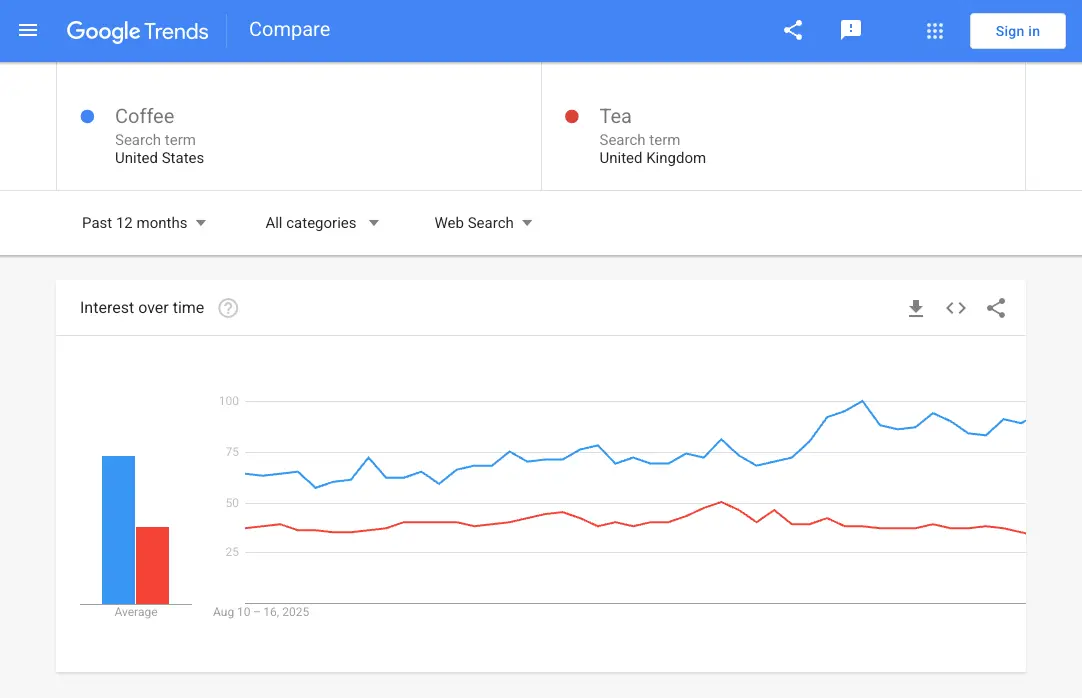
Example with q: Coffee,Tea and geo: US,GB
You can set a different location for each query by passing a comma-separated geo that follows the order of the queries in q. In this example, Coffee is measured in the United States (US) and Tea in the United Kingdom (GB). A single geo applies to every query.
{
  ...
  "interest_over_time": {
    "timeline_data": [
      {
        "date": "Aug 10 – 16, 2025",
        "timestamp": "1754784000",
        "values": [
          {
            "query": "Coffee",
            "query_index": 0,
            "value": "64",
            "extracted_value": 64
          },
          {
            "query": "Tea",
            "query_index": 1,
            "value": "37",
            "extracted_value": 37
          }
        ]
      },
      {
        "date": "Aug 17 – 23, 2025",
        "timestamp": "1755388800",
        "values": [
          {
            "query": "Coffee",
            "query_index": 0,
            "value": "63",
            "extracted_value": 63
          },
          {
            "query": "Tea",
            "query_index": 1,
            "value": "38",
            "extracted_value": 38
          }
        ]
      },
      {
        "date": "Aug 24 – 30, 2025",
        "timestamp": "1755993600",
        "values": [
          {
            "query": "Coffee",
            "query_index": 0,
            "value": "64",
            "extracted_value": 64
          },
          {
            "query": "Tea",
            "query_index": 1,
            "value": "39",
            "extracted_value": 39
          }
        ]
      },
      ...
    ],
  },
  ...
}
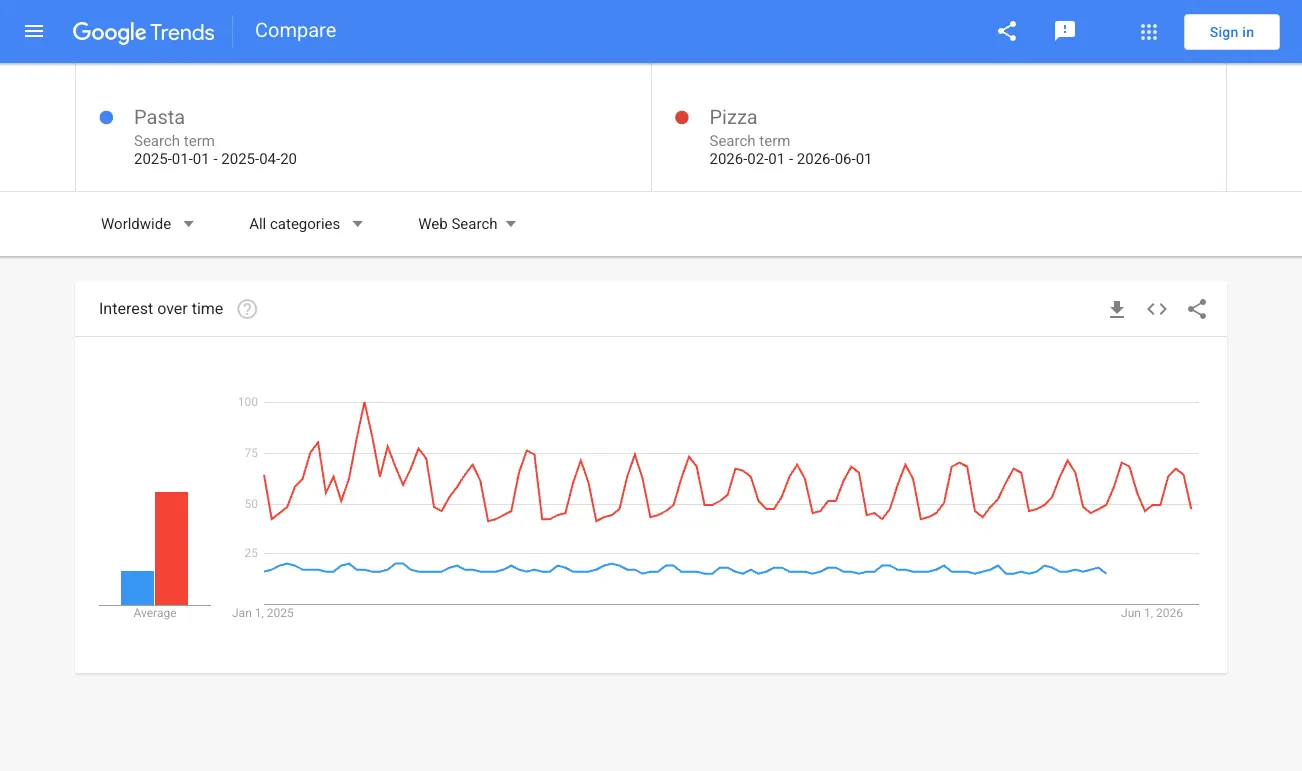
Example with q: Pasta,Pizza and date: 2025-01-01 2025-04-20, 2026-02-01 2026-06-01
You can set a different time range for each query by passing a comma-separated date that follows the order of the queries in q. In this example, Pasta is measured from 2025-01-01 to 2025-04-20 and Pizza from 2026-02-01 to 2026-06-01.
Since every query has its own time range, date and timestamp are returned inside each entry of values rather than at the timeline_data level. When the ranges do not cover the same number of days, the shorter one ends earlier and the remaining entries only contain the queries that still have data, as shown by the last entry of this example which only holds Pizza. Compared time ranges should still cover a reasonably similar time span.
{
  ...
  "interest_over_time": {
    "timeline_data": [
      {
        "values": [
          {
            "query": "Pasta",
            "query_index": 0,
            "date": "Jan 1, 2025",
            "timestamp": "1735689600",
            "value": "16",
            "extracted_value": 16
          },
          {
            "query": "Pizza",
            "query_index": 1,
            "date": "Feb 1, 2026",
            "timestamp": "1769904000",
            "value": "64",
            "extracted_value": 64
          }
        ]
      },
      {
        "values": [
          {
            "query": "Pasta",
            "query_index": 0,
            "date": "Jan 2, 2025",
            "timestamp": "1735776000",
            "value": "17",
            "extracted_value": 17
          },
          {
            "query": "Pizza",
            "query_index": 1,
            "date": "Feb 2, 2026",
            "timestamp": "1769990400",
            "value": "42",
            "extracted_value": 42
          }
        ]
      },
      ...
      {
        "values": [
          {
            "query": "Pizza",
            "query_index": 1,
            "date": "Jun 1, 2026",
            "timestamp": "1780272000",
            "value": "47",
            "extracted_value": 47
          }
        ]
      }
    ],
  },
  ...
}